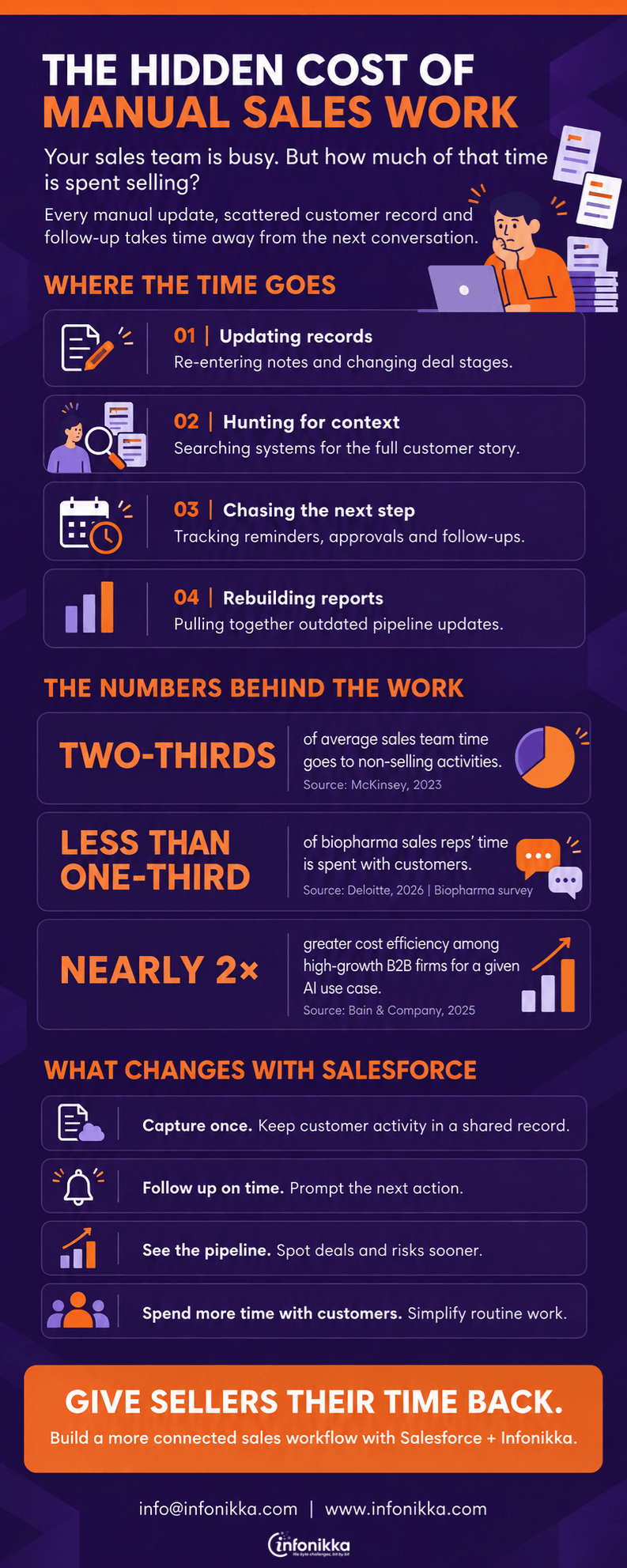
What a Better Sales Forecast Actually Requires

The forecast says the quarter looks healthy. Then three large deals move to next month, and the number changes overnight.

This is rarely a spreadsheet problem. A sales forecast depends on what the team knows about each deal, how honestly that information is recorded, and whether anyone notices when the buyer’s plans change. Salesforce can make those signals easier to see, but the team still has to act on them.

A close date the buyer recognises

Many opportunities carry a close date because the seller needs one for the forecast. That date becomes more useful when it reflects the buyer’s actual decision process.

Ask what must happen before a signature: a technical review, budget approval, procurement, or a meeting with another decision maker. Record the next milestone and who owns it. If the date depends on an event nobody has scheduled, the forecast should reflect that uncertainty.

Salesforce opportunity management lets teams track deal stages, activities, and next steps in one place. The quality of the forecast still depends on what sellers put there.

Stages based on evidence

“Proposal sent” tells you what the seller did. It says little about what the buyer has decided.

A stronger stage definition asks for evidence of progress. Has the buyer agreed on the problem? Are the people involved in the decision known? Has someone reviewed the proposal and explained what happens next? These questions make deal reviews more useful because everyone is judging progress by the same standard.

Keep the rules practical. If updating an opportunity feels like completing a long questionnaire, sellers will rush through it.

A clear view of stalled deals

A deal does not become risky only when the prospect says no. Silence, repeated meeting delays, and an unchanged next step can all matter.

Salesforce can show recent activity and highlight opportunities whose next steps have not been updated. Managers can use those signals to ask better questions: What changed? Is the buyer still working toward the original date? What can we do to help them decide?

Room for an honest answer

The most valuable forecast conversation may begin with “I’m less confident than I was last week.” If that admission is treated as poor performance, uncertainty stays hidden until the quarter ends.

Give sellers a way to explain both the upside and the risk in a deal. Then compare those judgments with what actually happened. Over time, the team can see where it tends to be optimistic and improve its assumptions. Forecasting becomes a habit of learning, not a weekly exercise in defending a number.

How Infonikka can help

Infonikka can help teams configure Salesforce opportunity stages, next steps, and reports around how their customers actually buy. It can also help sales leaders identify stalled deals earlier and make forecast reviews more useful.

Explore Infonikka’s Salesforce consulting services or contact info@infonikka.com to discuss your sales forecasting process.

White Paper: Real-Time or Right-Time? Choosing How Systems Exchange Data

A white paper for business and technology leaders

Executive summary

A customer places an order at 4:45 p.m. The sales team can see it. The warehouse cannot. At 5:00 p.m., the day’s shipping list closes, and the order waits until tomorrow.

The integration worked in a technical sense: the order eventually arrived. It simply arrived too late to do what the business needed.

Now consider a different exchange. Finance receives a sales report every morning at 7:00 a.m. The report is complete, accurate, and ready before anyone starts reviewing it. Updating it every few seconds would make little difference to the decisions it supports.

Both examples are about timing, but they call for different solutions. Yet integration projects are often given a single instruction: “Make it real-time.”

This paper asks a more useful question: When does the information need to arrive for someone to do their job well? The answer helps organizations choose between immediate requests, event-based updates, scheduled transfers, and access to data held elsewhere. It also brings less visible issues into the discussion: who owns the data, what happens when an exchange fails, and whether two systems mean the same thing when they use the same word.

Introduction: Why timing deserves its own decision

Most organizations have built their technology landscape over many years. Sales may work in a CRM platform, finance in an ERP system, customer service in another application, and operations in a mix of specialized tools. Trouble begins when someone must act using information that has not reached them.

The usual response is to connect the applications more closely. That may be necessary, but “connected” does not tell us enough. A connection can deliver a record in one second, ten minutes, or the next morning. It can also deliver an incorrect record very quickly.

Research gives some sense of why the underlying data work matters. McKinsey estimates that as much as 70% of the effort involved in developing AI-based solutions can be spent wrangling and harmonizing data. That estimate concerns AI development, not integration projects generally. It does illustrate the work created when information is difficult to combine and trust.

Integration influences application choices, too. BCG found that 53% of surveyed decision-makers who favored application suites cited seamless integration as their top technical benefit. Among respondents who preferred specialized applications, 66% named complex integration as a top risk. Neither result says that one type of application landscape is right for every company. Both show how seriously leaders take the work of making applications operate together.

Meanwhile, Deloitte reports that 55% of respondents in its 2025 Tech Value survey invest in data modernization. As those investments proceed, organizations need to decide how information will reach the people, reports, and processes that rely on it.

The choice is not simply “fast or slow.” It is about knowing what happens if the information is late.

Follow the decision, then set the clock

Imagine a customer service agent checking whether a replacement part can ship today. If the available quantity changes throughout the afternoon, the agent may need a current answer before making a promise. Yesterday’s inventory figure could cause a failed delivery and an awkward second call.

The same organization might send a weekly inventory trend to its planning team. That report does not need every change the moment it happens. It needs a consistent cutoff and numbers that reconcile.

These are two uses of inventory data with different clocks. A useful requirements discussion begins by writing down the action, the person taking it, and the latest acceptable arrival time for the information. “As soon as possible” is difficult to build against. “Before the agent confirms shipment” is testable.

Five questions help make the requirement clear:

  1. Who needs the information, and what will they do with it?
  2. How old can it be before the decision becomes unreliable?
  3. What happens if the source system is unavailable?
  4. How will the user know the information is delayed?
  5. Which system is responsible for the official answer?

The last question can be uncomfortable. Sales and finance might both hold a customer address, but only one may be authorized to change the billing address. Faster synchronization will not settle that disagreement. The teams need an ownership rule before they need another interface.

The four common ways to exchange information

An immediate request is familiar. One application asks another a question and waits for an answer. At checkout, a system might request payment authorization before confirming an order. A service agent might ask an inventory system for current availability. This approach suits decisions that cannot continue without a response. Its weakness is equally plain: if the responding system is slow or unavailable, the person waiting may be stuck.

An event works differently. One system records that something happened, such as “order placed” or “shipment dispatched.” Other systems receive that notice and do their own work. The original action does not have to wait for every downstream task to finish. This can work well when several teams need to react to the same change. It also requires care: a recipient may receive an event later than expected, receive it twice, or fail to process it.

A scheduled transfer groups records and moves them at agreed intervals. This is often sensible for reconciliations, historical reporting, or large volumes of changes that do not need individual attention as they occur. The schedule should be visible to the people using the data. “Updated daily” means little if nobody knows whether that happened at 6:00 a.m. or 11:00 p.m.

Finally, an application can show information held in another system without storing its own copy. This may be useful when a service agent needs to view an invoice kept in the finance system. It avoids maintaining two versions, though the experience depends on the source being available when the agent asks.

Salesforce’s integration guidance separates immediate requests, where the caller waits, from exchanges where work continues and the result follows later. It also documents batch transfers and access to externally held data as distinct patterns. These distinctions apply well beyond Salesforce.

Business need A pattern to consider Question to settle first
Confirm payment before showing success Immediate request and response What will the customer see if no response arrives?
Notify several systems that an order shipped Event-based update Who checks that each system processed the event?
Prepare a complete sales report each morning Scheduled transfer What is the agreed reporting cutoff?
Let an agent view an old invoice Access to data in the finance system What happens if that system is temporarily unavailable?

These are starting points, not fixed rules. The right answer depends on the process and the consequences of delay.

A sale is not an order

Consider a company that tracks opportunities in Salesforce and creates orders in an ERP system. A seller marks a deal as won. That is an important moment for the sales team, but it does not necessarily mean the ERP system has accepted an order.

If the seller must provide a confirmed order number while the buyer is still on the phone, an immediate request may be appropriate. The seller waits for the ERP response and can tell the customer whether the order was accepted. The drawback is that the sales task now depends on the ERP system responding promptly.

If a confirmed order number is not needed at that moment, Salesforce could publish an event after the opportunity is won. The ERP system creates the order and sends the number back later. The seller can continue working. The screen, however, must show that order creation is pending. Otherwise, someone may promise delivery for an order that has not yet been accepted.

Salesforce documents an opportunity-to-order example that uses an event and a later response from the ERP system. The example makes an important business distinction visible: a sale recorded in one system and an order accepted in another are separate steps.

Now ask what happens when the ERP system rejects the order because a product code is missing. Does the seller see a useful message? Does an operations team receive a task? Can someone correct the record and try again without creating a duplicate? The integration design is incomplete until those questions have answers.

The moment an integration fails

Successful transactions tend to disappear into the background. Failed ones reveal how much thought went into the design.

A temporary outage is different from bad data. If an application cannot be reached for a minute, trying again may solve the problem. If an order lacks a required address, another identical attempt will fail for the same reason. A system should make that difference clear and route the second case to someone who can correct it.

Retries bring another risk. Imagine an order request reaches the ERP system, but the response back to the CRM platform is lost. The CRM platform may assume the request failed and send it again. Without a way to recognize the original request, the ERP system could create two orders. A unique transaction identifier and checks at the receiving end can help prevent that outcome.

Microsoft’s reliability guidance covers controlled retries, queues, and ways to compensate for an earlier step when a longer process fails. The practical lesson for a business team is simpler: agree in advance how work will continue, stop, or be repaired when one step does not complete.

Give the exception a named owner. “IT will look at it” is rarely enough. Someone should know where to see the failed transaction, what the business user will see, when to involve the source-system team, and how to confirm that the correction reached every affected application.

One revealing test is to take a real transaction and interrupt it deliberately in a test environment. Turn off the receiving connection. Send the same request twice. Change the customer address halfway through. If the team cannot explain the result, the process needs more work before launch.

A fast answer can still be the wrong answer

Suppose the CRM platform defines an active customer as anyone with an open opportunity. The finance system defines an active customer as an account with a posted invoice in the past year. Both definitions may serve their teams. They cannot be swapped without explanation.

The same problem appears in less obvious fields. Does “available stock” exclude goods already reserved for another customer? Does “order complete” mean packed, shipped, or delivered? Which system owns a changed delivery address after an order has been placed?

Before moving important data, record its meaning, source, owner, and permitted uses. Decide which application can change it and what should happen when values conflict. Send only the fields needed for the task. An application requesting a shipping update does not need the entire customer record.

SAP Integration Suite offers ways to connect SAP and third-party systems through application integration, APIs, events, and other forms of exchange. Those tools can carry the information, but people must still agree on what it represents.

Access needs similar care. A system that can read an order status may not need permission to change an order or retrieve payment details. NIST’s zero trust guidance supports making access decisions explicit rather than trusting a connection merely because it sits within the organization’s network.

Measure what the connection changes

A technical team may report that nearly every message was delivered. That is useful, but it may hide the business problem. The few missing messages could be the orders that missed a shipping cutoff.

Measure both the exchange and its effect. On the technical side, track how long updates take, how many fail, how many require a retry, and how long exceptions remain unresolved. On the business side, track outcomes such as time from won deal to accepted order, manual corrections, missed shipments, and customer inquiries caused by an outdated status.

Take a baseline first. If order creation currently takes an average of two hours and requires ten manual corrections a week, write that down. After changing the process, compare the new results with the same measures. Faster delivery matters when it gives someone time to act or removes work they previously had to do by hand.

Where possible, show users when data was last checked. An inventory figure with a visible update time is more useful than one that looks current but may be hours old. A morning report should state its cutoff. People can make sensible decisions with delayed information when they know it is delayed.

Where to begin

Choose one journey that is causing a problem people can describe: an order that misses shipment, a service agent who cannot see delivery status, or a finance team that repeatedly repairs mismatched records.

Follow that journey across applications. At each handoff, ask who needs the information, when they need it, which system owns it, and what happens if it does not arrive. Some exchanges may need an immediate answer. Others may work better as events or scheduled transfers. A mixed design is normal.

Then test the difficult cases with the people who will handle them. A seller should understand what “order pending” means. An operations colleague should know where a rejected order appears. A manager should know whether a report reflects this morning’s transactions or yesterday’s.

The work is complete when the business can rely on the process, including when a system is having a bad day.

How Infonikka can help

Infonikka can help teams map the handoffs between SAP, Salesforce, and other enterprise applications, then choose an exchange pattern for each business need. That includes agreeing on data ownership, deciding how failures will be handled, and giving users a clear view of transaction status.

The first conversation can begin with one question: Where is information arriving too late, or arriving without enough trust to use it?

Explore Infonikka’s system integration services or contact info@infonikka.com to discuss that process.

Glossary

Term Plain-language meaning
API A defined way for one application to ask another for information or request an action.
Asynchronous exchange A system sends work onward and continues without waiting for the final result.
Batch transfer A group of records moved together at a scheduled time or interval.
Data freshness How recently information was updated or checked against its source.
Event A notice that something happened, such as an order being placed or a shipment leaving.
Idempotency A way of ensuring that sending the same request again does not create the same business result twice.
Latency The time between a change happening and another system receiving or using it.
Source of truth The system or agreed owner responsible for the official value of a piece of information.
Synchronous exchange A system makes a request and waits for the answer before continuing.

References

  1. McKinsey, Rewired to Outcompete. Data preparation estimates for AI solution development.
  2. BCG, Seven Questions for a Smarter Applications Strategy. Survey findings on integration and application choices.
  3. Deloitte, Valuing Data Assets. Finding from Deloitte’s 2025 Tech Value survey.
  4. Salesforce Architects, Integration Patterns. Guidance on immediate, asynchronous, batch, and virtual integration.
  5. Microsoft, Reliability Design Patterns. Guidance on retries, queues, and recovery.
  6. SAP Integration Suite. SAP and third-party integration capabilities.
  7. NIST, Zero Trust Architecture, SP 800-207. Access-control principles.

Connecting Customer Experience with Enterprise Operations: Salesforce and SAP Integration

Customers do not see departments, applications, or internal processes. They see one company. When a sales representative promises a delivery date, a customer expects the warehouse, finance team, service department, and logistics provider to work together to meet that promise.

This is where Salesforce and SAP integration becomes important.

Salesforce helps businesses manage customer relationships across sales, marketing, commerce, and service. SAP supports the operational side of the organization, including finance, inventory, procurement, manufacturing, order processing, and supply chain management. Connecting these platforms creates a more complete flow of information between customer-facing teams and enterprise operations.

Eliminating the Gap Between Sales and Operations

Without integration, sales teams may not have access to current inventory levels, customer credit status, production schedules, or shipping information. They may need to contact multiple departments before responding to a customer.

At the same time, operations teams may receive incomplete or delayed information about new orders, contract changes, customer expectations, or sales forecasts.

Salesforce SAP integration reduces these gaps by allowing relevant information to move between the two systems. A sales representative can view product availability, pricing, order history, and delivery status directly within Salesforce. Meanwhile, SAP can receive confirmed customer, quotation, and order details without repeated manual data entry.

The result is faster communication and fewer avoidable errors.

Creating a Consistent Customer Experience

A connected Salesforce and SAP environment supports a more reliable customer experience from the first conversation through delivery and ongoing service.

For example, once an opportunity is converted into an order in Salesforce, the information can be transferred to SAP for order processing, inventory allocation, invoicing, and fulfillment. Shipment updates can then be sent back to Salesforce, giving customer-facing teams a clear view of progress.

If a customer contacts the service team, the agent can see previous orders, product information, delivery records, warranties, and open issues in one place. The customer does not have to repeat the same information to different departments.

This visibility also helps teams respond more confidently when something changes. If an item is delayed or unavailable, sales and service teams can communicate the issue early rather than waiting for a complaint.

Better Data for Better Decisions

Integration also improves reporting and planning. Salesforce provides insights into opportunities, customer engagement, pipeline activity, and demand. SAP provides financial, inventory, production, and fulfillment data.

When these insights are connected, business leaders can compare sales forecasts with operational capacity. They can identify which products are generating demand, which orders are affecting margins, and where delivery delays may influence customer satisfaction.

This creates a stronger foundation for revenue forecasting, supply chain planning, and customer retention.

Building the Right Integration Approach

Successful Salesforce SAP integration requires more than connecting two applications. Businesses must define which data should be shared, which platform owns each record, how frequently information should be updated, and how errors will be handled.

Customer records, product data, prices, quotations, orders, invoices, payments, and delivery updates are common integration areas. However, the exact design should reflect the organization’s processes and business priorities.

When Salesforce and SAP work together, customer experience becomes closely connected to operational performance. Sales teams make promises based on reliable information, operations teams receive accurate demand signals, and customers receive a more consistent experience across every stage of the relationship.

How Infonikka Can Help

Infonikka helps businesses connect Salesforce with SAP to create smoother customer, sales, order, and revenue processes. Our team supports integration planning, Salesforce implementation, workflow customization, data synchronization, and ongoing platform support. Learn more about our Salesforce consulting and implementation services.

White Paper: From Lead to Loyalty: Modern Revenue Operations with Salesforce

Executive Summary

Revenue operations is often described as alignment between marketing, sales, customer success, and finance. That definition is correct, but it does not go far enough. Modern RevOps is the operating system that turns customer demand into predictable, profitable, and renewable revenue.

Most companies already generate leads, manage opportunities, prepare forecasts, approve discounts, create contracts, and run renewals. The problem is that each activity often sits in a different process, data set, or system. Each team sees part of the truth, while revenue performance depends on the whole picture.

Salesforce can provide a common commercial layer across this journey. Sales Cloud supports lead, account, contact, opportunity, routing, analytics, and automation. Revenue Intelligence adds pipeline visibility, opportunity scoring, deal insights, and forecasting capabilities. Agentforce Revenue Management, formerly Revenue Cloud, connects product catalog, pricing, quoting, contracting, orders, invoicing, and billing. Data 360, formerly Data Cloud, can unify customer information from Salesforce and external sources into a current customer profile.

The technology matters, but the operating design matters more. A successful Salesforce-led RevOps model needs shared definitions, clear ownership, dependable data, practical automation, pricing discipline, and a closed loop between acquisition and retention. This paper explains how to build that model.

  1. The Revenue Problem Is Usually a Connection Problem

A revenue engine can look healthy in separate dashboards and still underperform as a system. Marketing may report a rising number of qualified leads while sales complains about low quality. Sales may show a strong pipeline while finance sees heavy discounting and weak margins. Customer success may discover renewal risk only after a contract has entered its final weeks.

These gaps create familiar symptoms: slow lead routing, optimistic opportunity stages, spreadsheet-driven forecasts, email-based pricing approvals, disconnected contract terms, and late visibility into service or renewal risk.

RevOps addresses these issues by treating revenue as one lifecycle rather than a sequence of departmental handovers. Salesforce defines RevOps as a framework that aligns revenue-related activities across marketing, sales, customer success, and finance. The practical implication is simple: the same customer, product, price, commitment, and risk signals should remain visible from the first engagement through renewal.

It requires a common data model and a small number of trusted commercial processes.

  1. A Connected Salesforce Foundation

A modern Salesforce revenue architecture has five connected layers:

  • Customer: accounts, contacts, relationships, engagement, consent, and service history.
  • Pipeline: leads, opportunities, activities, stages, next steps, and forecast categories.
  • Commercial: products, pricing, quotes, contracts, orders, usage, and invoices.
  • Intelligence: scoring, deal health, forecasts, churn indicators, and recommended actions.
  • Governance: ownership, access, approvals, data quality, controls, and review cadences.

Salesforce products can support each layer, but the design should begin with business decisions rather than product features. Ask what a manager needs to know before approving a discount. Ask what evidence should move an opportunity to the next stage. Ask which signals should trigger a retention play. Then configure Salesforce around those decisions.

Data 360 is relevant when customer information is spread across commerce platforms, data warehouses, product systems, websites, ERP applications, and service tools. Salesforce describes it as a real-time data engine that unifies fragmented data into trusted customer profiles. Its architecture is designed to standardize, harmonize, and activate structured and unstructured customer data.

This unified layer gives RevOps a better basis for segmentation, prioritization, pricing context, forecasting, and retention. Instead of asking teams to search through several applications before making a decision, the important signals can be presented in the flow of work.

  1. Connected Lead Management: From Volume to Revenue Potential

Lead management should answer four questions quickly:

Who is this prospect? Why are they engaging? How valuable could the relationship become? What should happen next?

Many organizations still treat a lead as a form submission. That view is too narrow. A useful lead record should combine identity, account fit, source, product interest, buying role, engagement, territory, and previous history. The aim is to give the next person enough context to act well.

Salesforce supports lead, account, contact, and opportunity management, along with built-in flows and lead routing. Automation can capture leads, assign them to the right representative, and start a nurture sequence so that follow-up is timely and consistent. Einstein scoring can also help teams prioritize leads and opportunities based on conversion or close likelihood.

A stronger operating model uses three forms of qualification.

Fit

Fit asks whether the organization resembles customers the business can serve profitably. Relevant factors may include industry, size, geography, technology environment, business model, and regulatory needs.

Fit should not be based only on company size or job title. It should reflect the conditions under which the organization can deliver meaningful customer value without excessive commercial or delivery risk.

Intent

Intent looks at behavior. Multiple visits to product pages, an event conversation, a pricing request, a partner referral, or engagement from several people at the same account may indicate active interest.

One isolated action may not mean much. A pattern of activity across several stakeholders is usually more valuable than a single content download.

Readiness

Readiness tests whether a real buying process exists. There should be a business problem, a likely owner, a reason to act, and a credible next step.

These signals should drive routing. High-fit, high-intent accounts may go to an account executive, while high-fit but low-readiness prospects enter nurture. Existing customers should route to the account owner or expansion team.

The marketing-to-sales handover needs a service-level agreement covering response time, acceptance, rejection reasons, and return to nurture. Use a small set of rejection codes rather than free-text notes.

The goal is not to produce a perfect score. It is to create a learning loop. RevOps should review which sources create accepted pipeline, which segments progress, which messages lead to meetings, and which cohorts become profitable customers.

Lead management becomes valuable when it learns from revenue outcomes, not merely from click activity.

  1. Opportunity Intelligence: Make Deal Health Observable

An opportunity record should describe the customer’s buying journey, not the seller’s hope.

Weak pipelines have a familiar pattern: stages move without evidence, close dates roll, next steps become vague, and large deals dominate despite limited engagement. The answer is a small set of verifiable stage criteria combined with behavioral signals.

A stage should represent a completed customer milestone. Discovery requires a defined problem, stakeholders, impact, and next meeting. Solution validation requires customer assessment against agreed needs. Commercial review requires known scope, pricing structure, and purchasing process. Commit status requires confirmed decision steps and no critical unresolved blocker.

Salesforce Pipeline Inspection provides a consolidated view of pipeline, key changes, filters, and deal-health insights. Deal Insights can use information from opportunities, calls, emails, and cases to surface predictions and recommendations. Activity heatmaps can also show engagement levels at a glance.

RevOps should combine these signals into a practical deal-health model. Useful indicators include:

  • Days in stage compared with similar won deals
  • Movement in expected value or close date
  • Recency and direction of customer engagement
  • Number and seniority of active contacts
  • Unresolved service cases for an existing customer
  • Product, legal, security, or procurement dependencies
  • Discount requests before value has been established
  • A missing next step, decision date, or mutual action plan

AI-generated scores are useful, but they should support judgment rather than replace it. A score can tell a manager where to look. It cannot always understand a strategic relationship, a board decision, a new regulatory deadline, or a competitor’s last-minute move.

The best pipeline review is therefore a decision meeting, not a status meeting.

Leaders should ask:

What changed? What evidence supports the current stage? What must happen next? What help is needed? Which opportunities should be removed, accelerated, re-priced, or escalated?

This changes the tone of pipeline management. Sellers are no longer encouraged to defend every opportunity. They are encouraged to present evidence, identify risk early, and ask for the right support.

  1. Forecasting: From Roll-Up Exercise to Operating Discipline

Forecast accuracy is not created at the end of the quarter. It is produced by the quality of decisions made throughout the quarter.

Salesforce Revenue Intelligence includes Einstein Forecasting, CRM Analytics, activity capture, and pipeline capabilities. The Forecast Insights dashboard can track forecast changes, velocity, pipeline coverage, and period-over-period performance.

This provides a useful analytical foundation, but a reliable forecast still depends on agreed definitions and management behavior.

A modern forecast should contain several views.

The Seller View

This reflects the representative’s judgment based on customer evidence, active conversations, known risks, and the buying process.

The Manager View

The manager adjusts the forecast based on deal quality, coaching conversations, team history, resource needs, and patterns across similar opportunities.

The Analytical View

This view uses historical conversion, stage aging, activity, close-date movement, opportunity scoring, and other measurable patterns.

The Scenario View

This shows the expected case, downside risk, best case, and available upside. It allows leaders to understand both the likely outcome and the actions that could change it.

Differences between these views reveal assumptions that need examination.

RevOps should also separate pipeline sufficiency from forecast confidence. A team may have enough total pipeline but too little mature pipeline. It may have strong coverage but excessive concentration in one deal. It may be on plan for bookings while missing the product mix or margin required by the business.

A weekly forecast should focus on changes: new pipeline, slipped deals, value movements, stage regression, risk concentration, and actions required. Track forecast bias by team and manager over time.

Forecasting should lead to decisions about hiring, delivery capacity, cash flow, marketing investment, partner support, and executive involvement. When the forecast is treated only as a sales number, much of its strategic value is lost.

  1. Pricing and Revenue Management: Protect Speed Without Giving Away Value

Pricing is where growth, customer value, competitive pressure, and financial discipline meet.

When pricing is disconnected from CRM, the result is usually slow approvals, inconsistent discounts, manual quote errors, and limited visibility into what was promised.

Salesforce Agentforce Revenue Management, formerly Revenue Cloud, is designed to connect product catalog management, pricing, configuration, quoting, contracting, order-to-cash, and billing. Salesforce Pricing supports standard prices and adjustments for scenarios such as volume, subscription, and bundle pricing.

The RevOps objective is to make the right deal easy and the wrong deal visible.

Establish a Controlled Product Catalog

Products, bundles, eligibility rules, terms, and price structures should use common definitions across sales, finance, commerce, and delivery.

A seller should not need a private spreadsheet to understand what can be sold. Product owners should have clear responsibility for catalog accuracy, product changes, dependencies, and retirement rules.

Create Practical Pricing Guardrails

Pricing guardrails may include discount bands, floor prices, approval thresholds, term checks, margin expectations, and exception reasons.

Straightforward deals should flow quickly. Unusual deals should receive scrutiny based on value, risk, and complexity.

Approval logic should distinguish discount from deal quality. A larger discount on a strategic multi-year commitment may be stronger than a smaller discount on a short, complex contract.

Approval screens should show margin, term, payment conditions, delivery scope, renewal rights, risk, and total relationship value. This gives decision-makers the commercial context behind the percentage.

Connect Quotes, Contracts, Orders, and Billing

Contract data should remain connected to the opportunity and quote. Salesforce Revenue Management supports contract creation and updates across the customer lifecycle, including renewals, while contract capabilities can pull relevant account and transaction information into the process.

This connected model improves post-sale accuracy. The final order, entitlements, assets, usage rules, invoice schedules, and renewal terms should reflect what the customer accepted.

When commercial data remains structured, teams can manage amendments, co-terms, renewals, cancellations, and usage-based models with fewer manual reconciliations.

Pricing analytics should also move beyond average discount. RevOps should examine:

  • Win rate by price band
  • Margin by segment
  • Approval turnaround time
  • Exception frequency
  • Bundle adoption
  • Renewal uplift
  • Sales-cycle impact
  • Quote-to-contract variance
  • Revenue leakage between quote, order, and invoice

The objective is not to eliminate commercial flexibility. It is to understand when flexibility creates value and when it quietly destroys it.

  1. Customer Retention: Bring Post-Sale Signals Into the Revenue Engine

Retention should not begin with a renewal reminder. By then, the outcome may already be largely determined.

A connected retention model brings together commercial history, product use, stakeholder engagement, service experience, payment behavior, adoption, and renewal terms. Salesforce guidance describes a Data 360 Retention Risk Score combining signals such as annual contract value, renewal timing, case volume, case age, and satisfaction history.

The operating model should define customer health at three levels.

Relationship Health

Relationship health looks at sponsor strength, stakeholder coverage, engagement quality, executive access, organizational changes, and sentiment.

The loss of one influential sponsor can create significant risk, even when day-to-day users remain satisfied.

Value Health

Value health examines adoption, usage, outcomes achieved, time to value, and progress against the original business case.

Usage alone may not show value. A customer could use the product frequently without achieving the business improvement that justified the purchase.

Commercial Health

Commercial health tracks contract position, payment status, renewal date, pricing exposure, expansion potential, commitments, and competitive risk.

A single red-amber-green status is rarely enough. RevOps needs the underlying components, not just the color.

Retention plays should be triggered by signals and tied to ownership. A fall in usage may create an adoption intervention. A cluster of unresolved service cases may trigger an executive recovery plan. A renewal entering its planning window should create tasks for value review, stakeholder mapping, pricing preparation, and commercial strategy.

A highly successful customer may enter an advocacy or expansion journey.

Sales and service must share context. Salesforce positions Service Cloud and Agentforce as ways to bring sales and customer service together through shared data, AI, and automation. This matters because service issues can affect open opportunities, while sales promises can create service expectations.

Retention performance should be measured through gross revenue retention, net revenue retention, renewal rate, churn, contraction, expansion, adoption, case trends, and renewal forecast accuracy. Customer retention rate itself measures the proportion of customers kept over a defined period.

Build a Revenue Decision Layer

Most organizations have a reporting layer. Fewer have a decision layer.

A reporting layer shows what happened. A decision layer tells people what requires attention, why it matters, who owns it, and what action should follow.

This is the first critical factor in modern RevOps.

In Salesforce, the decision layer can combine workflow, alerts, scores, approval rules, dashboards, and AI-supported recommendations. The key is restraint. Do not produce dozens of alerts. Define a limited set of commercial moments where timely action can change the outcome.

Examples include:

  • A high-value lead with strong intent has received no response.
  • A strategic opportunity has lost customer engagement.
  • A close date has moved twice without a new customer commitment.
  • A discount exceeds the normal range for the segment.
  • A quote contains a non-standard term.
  • A customer with an open renewal has critical service cases.
  • Product usage has dropped below an agreed threshold.
  • An invoice dispute threatens an expansion or renewal.

Each signal needs an action, owner, and deadline. Otherwise it becomes dashboard decoration.

The decision layer should also show the reason behind a recommendation. Teams trust a warning more when they can see the contributing factors: stage age, contact inactivity, unresolved cases, usage decline, or price exception.

Human judgment remains central, but it is directed toward the moments where it has the highest value.

Create a Commercial Memory

Companies lose revenue when they forget what they have learned.

A salesperson may know why a deal was discounted. A solution consultant may remember which requirement was difficult. Finance may know why payment terms changed. Customer success may know which outcome matters most.

When those people change roles, the commercial context often disappears.

The second critical factor is a structured commercial memory inside Salesforce.

This memory should preserve the logic of the relationship, not every email:

  • The customer’s original business problem and success measures
  • Key stakeholders, their influence, and changes over time
  • Why particular products and terms were selected
  • Important risks, objections, and commitments
  • Pricing exceptions and their rationale
  • Implementation assumptions
  • Value achieved and supporting evidence
  • Service recovery history
  • Renewal decisions and competitive context

This context improves future decisions. New owners understand the relationship faster, renewal teams connect delivered value to terms, pricing leaders distinguish precedent from exception, and product teams see recurring friction.

Data 360 and Salesforce’s shared CRM model can help connect information from across the lifecycle, but the memory must be deliberately designed.

Keep it structured, concise, searchable, and owned. Commercial memory turns individual experience into an institutional asset.

  1. A Practical Implementation Roadmap

A Salesforce RevOps transformation should be delivered in stages. Trying to redesign the full revenue lifecycle at once usually creates a large program with slow adoption.

Phase 1: Diagnose the Revenue Journey

Map the path from first engagement to renewal. Identify handovers, delays, duplicate data, spreadsheet dependencies, approval bottlenecks, and disagreements. Use real deals and customer journeys.

Establish a baseline for conversion, stage duration, forecast accuracy, discount levels, approval time, quote errors, renewal rate, churn, and data completeness.

Phase 2: Define the Commercial Language

Agree on lifecycle stages, lead definitions, opportunity criteria, forecast categories, product structures, discount types, customer-health components, and renewal stages.

Assign an owner to every definition.

This work may feel administrative. It is foundational. Automation built on ambiguous definitions only moves confusion faster.

Phase 3: Stabilize Core Salesforce Data

Remove duplicate records, rationalize fields, define required information by stage, clarify source systems, and establish data stewardship.

Prioritize fields that support decisions. Do not ask sellers to maintain data that nobody uses.

Integrate the highest-value sources first: marketing engagement, ERP customer and invoice information, product usage, support cases, contracts, and identity data. Use Data 360 where unification across several sources and identities is necessary.

Phase 4: Redesign Workflows

Configure lead routing, acceptance rules, opportunity stage gates, forecast processes, pricing approvals, quote generation, contract handovers, renewal triggers, and retention plays.

Design for the common path with controlled exceptions, and test with frontline users.

Phase 5: Add Intelligence

Introduce scoring, Pipeline Inspection, Forecast Insights, risk indicators, and recommended actions after the underlying data and processes are dependable.

Salesforce’s Einstein and Revenue Intelligence capabilities can support prioritization, deal analysis, and forecasting, but model output should be reviewed for relevance, bias, and adoption.

AI should initially support a clearly defined set of decisions. Broad, loosely governed AI initiatives are harder to measure and more difficult for teams to trust.

Phase 6: Establish Operating Cadences

Create weekly pipeline and forecast reviews, monthly funnel and pricing reviews, quarterly segment analysis, and structured renewal-risk meetings.

Use the same Salesforce views in meetings and daily work. This reduces the temptation to create separate spreadsheets for leadership discussions.

Phase 7: Improve Through Evidence

Track both adoption and business outcomes.

Remove low-value fields and alerts. Adjust stage criteria when they do not predict progress. Refine pricing rules when exceptions become common. Retrain scoring when customer behavior or go-to-market strategy changes.

RevOps is not a one-time implementation. It is a management discipline supported by a platform.

  1. Metrics That Show Whether RevOps Is Working

A balanced RevOps scorecard should cover the whole lifecycle.

For demand and pipeline, track lead response time, acceptance rate, qualified pipeline created, conversion by source, stage progression, sales cycle, and pipeline coverage.

For opportunity quality, track stage aging, close-date movement, next-step completeness, stakeholder coverage, forecast-category changes, and win-loss reasons.

For pricing and revenue, track approval time, discount distribution, margin, quote error rate, non-standard terms, contract cycle time, order accuracy, and revenue leakage.

For customers, track time to value, adoption, service risk, renewal forecast, gross revenue retention, net revenue retention, expansion, and churn.

The leadership view should connect these measures.

A fast sales cycle with poor retention is not success. A high win rate created by uncontrolled discounting is not success. A precise forecast on shrinking revenue is not success.

Modern RevOps measures the quality, predictability, profitability, and durability of revenue.

Conclusion

Salesforce can connect lead management, opportunity intelligence, forecasting, pricing, contracting, service, and retention on a common platform. Yet the platform does not create alignment by itself.

The strongest RevOps organizations make revenue decisions visible. They use shared definitions, disciplined processes, connected customer data, controlled pricing, and clear ownership. They learn from every lead, deal, exception, service issue, renewal, and loss.

The result is more than operational efficiency. It is a revenue engine that responds faster, forecasts with greater confidence, protects value, and grows through longer customer relationships.

How Infonikka Can Help

Infonikka helps businesses turn Salesforce into a connected revenue operations platform rather than another standalone CRM. Our Salesforce consultants work with organizations to assess existing revenue processes, improve data quality, configure workflows, integrate business systems, and build dashboards that give teams a shared view of performance. We can connect lead management, opportunity tracking, forecasting, pricing approvals, customer service, and renewal processes around one practical operating model. Our support covers Salesforce consulting, implementation, customization, integration, enhancements, and ongoing platform support. By aligning technology with the way marketing, sales, finance, and customer success teams actually work, Infonikka helps organizations reduce manual effort, improve revenue visibility, and create more consistent customer experiences. Learn more about Infonikka’s Salesforce Consulting Services.

Agentforce: Building the Agentic Enterprise

For years, businesses have invested in CRM systems, automation tools, and analytics platforms to improve customer experiences and operational efficiency. Yet many teams still spend significant time on repetitive tasks, manual follow-ups, data entry, and routine customer interactions. The next phase of enterprise transformation is not simply about automation. It is about creating intelligent digital agents that can understand context, take action, and support employees in real time. This is where Salesforce Agentforce is changing the conversation. Agentforce introduces AI-powered agents that can work alongside employees, helping organizations streamline sales, customer service, operations, and internal workflows. Instead of acting as simple chatbots, these agents are designed to perform meaningful business tasks while remaining connected to trusted customer and enterprise data.

What Is Agentforce?

Agentforce is Salesforce’s platform for building and deploying autonomous AI agents across the enterprise. These agents can understand requests, access relevant business information, complete tasks, and support decision-making without requiring constant human intervention. Unlike traditional automation tools that follow predefined rules, Agentforce agents can adapt to context and respond dynamically based on customer interactions, business processes, and organizational data. The result is faster execution, improved efficiency, and a better experience for both employees and customers.

Transforming Sales Productivity

Sales teams spend a considerable amount of time on administrative work rather than selling. Agentforce can help by:

  • Qualifying leads automatically
  • Summarizing customer interactions
  • Drafting follow-up emails
  • Recommending next-best actions
  • Updating CRM records

By reducing manual effort, sales representatives can focus more on building relationships and closing opportunities.

Enhancing Customer Service

Customer service teams are expected to provide fast and accurate support across multiple channels.

Agentforce enables AI agents to:

  • Resolve common customer inquiries
  • Retrieve account information instantly
  • Guide customers through self-service options
  • Escalate complex issues when needed
  • Provide agents with contextual recommendations

This creates faster response times and a more consistent customer experience.

Improving Operations and Employee Productivity

Beyond sales and service, Agentforce can support internal operations across departments. Employees can use AI agents to access information, generate reports, automate approvals, track requests, and manage routine workflows. Instead of searching through multiple systems, employees can interact with intelligent agents through natural language and receive immediate assistance. This helps reduce administrative burden and improves overall productivity.

AI Agents That Take Action

What makes Agentforce particularly powerful is its ability to move beyond conversation and into execution. Many AI tools today focus on answering questions. Agentforce focuses on completing work. Imagine a customer requesting an order update. An AI agent can retrieve order information, verify shipment status, communicate updates, create follow-up tasks, and notify relevant teams, all within a single interaction. Similarly, a sales agent can identify stalled opportunities, recommend outreach strategies, schedule follow-ups, and update records automatically. This ability to combine intelligence with action is what defines the emerging Agentic Enterprise. Organizations that successfully deploy AI agents will gain a significant advantage in productivity, responsiveness, and operational efficiency.

How Infonikka Can Help

At Infonikka, we help organizations unlock the full value of Salesforce investments through consulting, implementation, customization, integration, and managed services. Our Salesforce experts work closely with clients to identify high-impact use cases for Agentforce, design intelligent workflows, integrate enterprise systems, and ensure AI agents deliver measurable business outcomes. Whether you are exploring Agentforce, modernizing customer engagement processes, improving employee productivity, or scaling Salesforce across your organization, Infonikka can help you build a practical roadmap for AI-driven transformation. The future of business is not about replacing people with technology. It is about empowering people with intelligent agents that help them work faster, make better decisions, and deliver better customer experiences.

That future is already taking shape through Agentforce. To know more about Salesforce Services, visit our https://infonikka.com/salesforce-consulting/


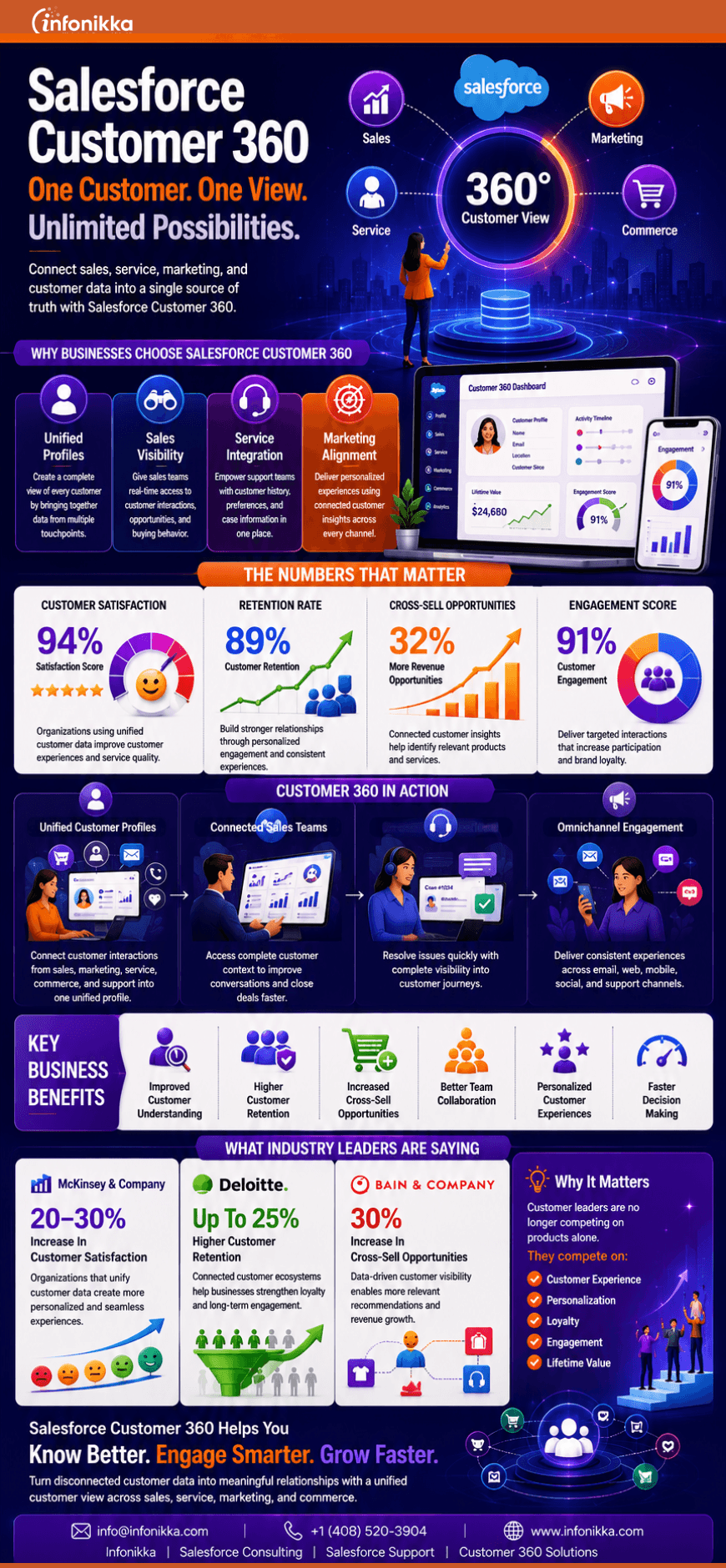
Infographic: Limitless growth possibilities with Salesforce 360

Customer expectations have changed dramatically. Today’s customers interact with businesses across multiple channels and expect every interaction to feel connected, personalized, and relevant. Salesforce Customer 360 helps organizations unify customer data across sales, service, marketing, and commerce to create a complete view of every customer.

By bringing together customer insights, engagement history, and business data into a single platform, Salesforce Customer 360 enables better decision-making, stronger customer relationships, higher retention rates, and increased revenue opportunities. It empowers teams to deliver seamless experiences at every stage of the customer journey.

Explore this infographic to learn how Salesforce Customer 360 helps businesses create connected customer experiences, improve collaboration across teams, and drive measurable business outcomes.

Conclusion

In a world where customer experience is a key competitive advantage, having a unified customer view is no longer optional. Salesforce Customer 360 helps organizations connect data, align teams, personalize engagement, and build lasting customer relationships that drive long-term growth.

To know more about our Salesforce Consulting, Salesforce Customer 360, CRM Transformation, and Managed Support Services, visit Salesforce Consulting Services | Salesforce Implementation – Infonikka


4 Captivating Reasons Why Businesses Choose Salesforce?

4 Captivating Reasons Why Businesses Choose Salesforce?

Salesforce is a powerful & one of the earliest software to build CRMs. Growing a business means understanding the customer needs and making the best use of digital services. Every business requires a service that boosts sales which is just not about selling the products or services to the existing customers. But also, to use a systematic and efficient way of gathering leads so that they can be converted to sales and ultimately build customers.

Why should you choose Salesforce for your business?


Security


Every business is concerned about its confidential information. Data security has been one of the best quality features of Salesforce. Salesforce has a pre-installed security feature that allows business owners to decide who within their organisation can access their data, making this a very reliable and secure software. Salesforce has great engineers & data security professionals ready to ensure that the cloud and your data are never at risk.

Effective Sales and Marketing Management


This is one of the main reasons that encourage business owners to adapt to Salesforce. Salesforce is so popular because it is packed with features such as contact management, workflow creation, task management, customer engagement tools, and an intuitive, mobile-ready dashboard. Along with these features, there are features designed for marketers such as social media integration, marketing leads monitoring and email integration. For salespeople, sales forecasting, sales communities and sales leads monitoring are all helpful features.

Constantly Innovating


As one of the earliest cloud-based CRM solutions in the market, the Salesforce community is innovating every day. With Certified Salesforce Consultants, we are continually looking for new and inventive ways to improve products and services. This is all by having positive feedback from our customers, we release new features and functionality.

Multi-tenant


One of the great advantages of Salesforce is that its performance does not vary between large or small businesses. Every business has the advantage of access. That means all customers have common networking, hardware and software platform. The multitenant architecture also ensures that updates and upgrades are prompt, without the requirement of customer intervention.

Conclusion


Salesforce performs better for more individual features. That being said, Salesforce may not be the best CRM for every company. Therefore, it’s important to keep your requirements in mind when researching CRMs. Your business deserves the best, and as a leading Salesforce development company in the US, Infonikka can help you get there.

Enhance your CRM with our Salesforce Integration

Salesforce is a successful business enhancement platform that empowers an organization to redefine its relationships with the clients.  Integrating Salesforce CRM is the most efficient way to automate your business processes to quickly build your connected customer experience. Starting your salesforce integration journey may seem difficult as it comes with many problems along with delays, unexpected costs and resource limitations, but as one of the best salesforce integration service providers we promise to make it easy for you. 

We, as a Salesforce Integration Provider, believe that all systems in a business should work in synchronisation with all the departments of a firm. The success of Salesforce CRM implementation is directly linked to accurate & up to- speed information. Salesforce data integration uses different cases and they are beyond the traditional Salesforce CRM Integration.  Below are some most used cases of Salesforce Integration.

ERP – Enterprise Resource Planning

ERP is the most common among the used cases belonging to salesforce integration. Integrating ERP systems brings tremendous benefits to your business sales and service teams by extending relevant information from both systems. From end-to-end visibility of data to forecasting and good ROI, you will receive up-to-date sales information with the help of ERP. Infonikka performs Salesforce Integration with the leading ERP systems like SAP, Microsoft Dynamics 365, NetSuite, Oracle ERP Cloud, Acumatica and more.

Marketing Automation Integration

CRM Integration with Marketing automation systems assist in better sales and market approach. Integrating them you get reengagement of cold leads, established lead nurturing, a transparent influence of the marketing campaigns on sales, and a consistent customer experience. Marketing automation systems like HubSpot, Marketo, MailChimp and others enable organizations to get accurate and up-to-date information related to their cold leads, existing leads, effective marketing, sales campaigns and much more.

Accounting Integration

Connecting your Salesforce CRM with an accounting application helps you to share financial data with the sales team and aids them in improving customer profiles, managing invoices, managing intercompany transactions, and obtaining data-driven insights. Possible Salesforce integrations here include QuickBooks, Zoho Books, Xero, and more.

E-Commerce Integration

This kind of integration allows an increase of revenue per customer, augmentation of your customer services and rise in business sales. Salesforce integration with ecommerce platforms include Magento, Shopify, Zuora, WooCommerce and others.

Why do you and your Business need Salesforce Integration?

Salesforce has become the most trending platform that is used by almost all businesses around the world to enhance their customer relationships. To ensure maximum benefits and boost productivity, businesses are now integrating Salesforce with other systems. Our experts at Infonikka ensure successful salesforce integration by minimizing the complexities and risks that comes along with it, and simultaneously improving the returns on investments.

Integrate Netsuite and Salesforce

Reasons why you should Integrate Netsuite and Salesforce

NetSuite is the best when it comes to cloud ERP system and Salesforce is the best when it comes to cloud CRM system. It’s a no brainer that integrating them will be very beneficial to any business. But before diving into the benefits of NetSuite and Salesforce integration, let’s visit the fundamentals of NetSuite and Salesforce first.

What is NetSuite?

NetSuite is the #1 cloud ERP system in the world. NetSuite helps organizations to manage all the vital business processes in a single system. It’s a scalable and agile system that efficiently grows with your business. The most notable features of NetSuite are,

  • Financial Management
  • Ecommerce Services
  • Inventory and Warehouse Management

What is Salesforce?

Salesforce is the world’s best cloud CRM system. It offers uniquely excellent CRM solutions that make customer retention and user adoption easy. Some of the exceptional Salesforce CRM features are,

  • Efficient Task Management
  • Reliable Analytics
  • Sales Forecasting

Also for a better understanding of integration, here’s an overview of System Integration services.

Benefits of NetSuite to Salesforce Integration:

1. Wider View of the Customer and Business Activities:

The main benefit of integrating NetSuite and Salesforce is the visibility it provides you. This integration offers a 360-degree view of your customer activities and business processes. From key financial information of your company to precise analytics, the Salesforce integration with NetSuite will provide you with total visibility of your business. With this transparency, you can acquire valuable business insights to make informed decisions based on them.

2. Streamlined Business Processes:

NetSuite sorts out all the financial processes like transactions, salary payouts, accounting, billing, etc. Salesforce streamlines internal communications, customer data, sales management, and more. These two software together efficiently automate finance, human resources, and many other processes. The smart automation of complex business processes help you spend less effort and gain more benefits.

3. Easy Information Accessibility:

The integration of NetSuite and Salesforce also delivers easy access to the data that once was inaccessible. The collaboration of these two programs provides reliable client data and scalability. The easy access to information can help you in serving your clients faster and more efficiently.

Now that you know why integrating NetSuite with Salesforce is important, let’s explore how to actually integrate them. You can try integrating them with the help of third-party integrators like Boomi and Celigo. Also, you can leverage the NetSuite API to integrate both these programs. However, the most affordable and efficient option is – to opt for an integration services provider partner.

As one of the leading and experienced integration services provider, Infonikka ensure successful integration by minimizing the complexities and risks with improved ROI and reduced costs. We at Infonikka boast a vast portfolio of integration services including the NetSuite and Salesforce integration. Our integration experts possess years of experience in providing comprehensive integration services. With our unmatched key integration expertise, we’ll help you take your business to the next level.

salaesforce consultant can increase roi

How Salesforce Consultant Can Increase Your Business ROI?

Want to implement Salesforce in the best way possible? What is the best way, you ask? The answer is by hiring a Salesforce consulting partner! If you think otherwise, let us explain in detail how the Salesforce consultant helps you increase your business ROI.

The Salesforce era has dawned upon us and it seems as it’s not going to end in the near future. Salesforce professionals have helped a lot of businesses, ranging from small-scale startups to large-scale corporations, in enhancing their business processes. And that’s why Salesforce is considered the world’s #1 CRM system.

  • Salesforce alone acquires around 20% of the CRM market share
  • Around 90% of Fortune 100 companies are using Salesforce apps

Read on to know more about what makes Salesforce the best CRM?

However, most of the companies are just scratching the surface of what they can achieve with Salesforce. Just take a look at this statistic.

  • According to a survey, only 17 % of the users utilize all the features offered by the Salesforce CRM

Although, Salesforce is known for being easy to use and manage. To gain its maximum benefits, we’ll advise you to prefer a Salesforce consulting partner rather than doing it by yourself. And here are the reasons why.

1. Unique Solutions Forged for Your Business:

Due to their years of experience, the Salesforce consulting companies possess top-class Salesforce expertise. The Salesforce consulting partners start with studying your business and current business processes. And then they devise an exclusive Salesforce implementation plan strategy based on your internal business process perspective. This detailed implementation plan is the backbone of your Salesforce setup. And it effectively enhances your business processes.

2. Help You Move Ahead with the Latest Trends:

The Salesforce consulting companies have a team of Salesforce certified professionals who are aware of the latest innovations in Salesforce technology. As they are constantly on top of the latest Salesforce trends, the Salesforce professionals make you aware of those trends and their scope in your business. Which, you never would have known otherwise.

3. Simplifies the Implementation Process:

Even if your business has real-time, complex business processes, the Salesforce consultants can still formulate a simplified Salesforce implementation strategy. As they study your business closely, the Salesforce consulting companies acquire deep business process expertise around your business. This helps them streamline your business processes and simplify the implementation plan. 

4. Save Your Time & Money:

If you don’t want to hire a Salesforce consulting partner, then you’re left with the option of training your own employees in Salesforce. Opting for this will cost the training time to be spent by the employee as well as the training expenses bore by you. And even after spending that many resources, you can’t guarantee a successful implementation. Because your employee doesn’t have the required expertise yet. Thus, by hiring a Salesforce consultant, you’re saving a lot of resources.

All these benefits of hiring a Salesforce consultant lead to an upsurge in your business ROI. By getting already devised exclusive Salesforce solutions, you’re gaining user adoption. By keeping up with the trend, you’re taking advantage of the latest, top-notch technologies. By simplifying the implementation processes, you’re improving business performance. And by saving up resources, you’re positively impacting your ROI.

Now you know why to hire a Salesforce Consulting Company, but who to hire? that still remains a question. Don’t worry, we’ve got the answer for you: Infonikka, one of the best Salesforce services providers in the industry. At Infonikka, we provide expert Salesforce certified professionals and deliver the best Salesforce services.